
What is JWT#
JWT stands for JSON Web Token. As the name says, it is an open standard (RFC 7519) that uses the JSON format to build tokens.
When to use JWT#
Authorization: after a user logs in, the token lets the user, server, or service access the resources it has rights to.
Information Exchange: with a public/private key pair, a digital signature makes sure the data is safe and complete during transfer.
How JWT verification works#
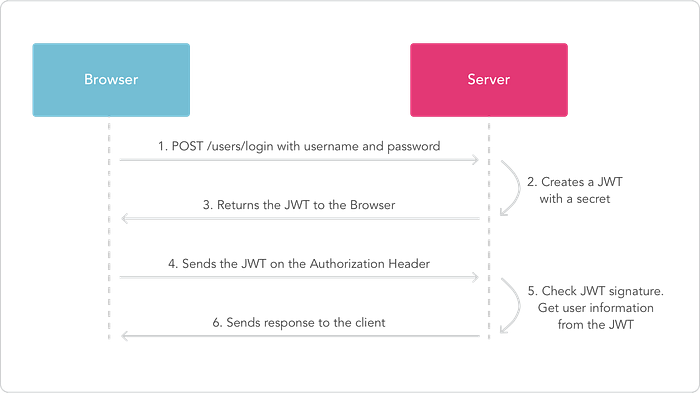
The browser logs in with a username and password.
After the server checks the login is correct, it gives out a valid JWT string.
The browser gets the JWT string and stores it in Local Storage.
When the browser wants to access the server, it adds
Authorization: Bearer <JWT_token>in the request header.The server receives it and checks if the JWT token is valid.
If it is valid, the browser is allowed to access the server data.
The parts of a JWT#
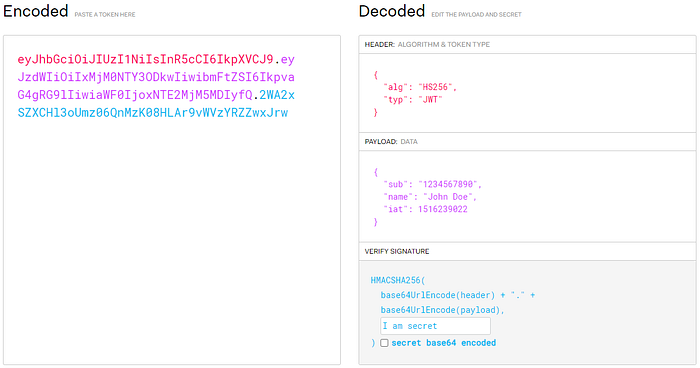
A JWT is made of three JSON objects: Header, Payload, and Signature. Each object is encoded with Base64, and the three parts are joined with a . between them. You can use the JWT official website to decode a token and see the information inside.
Header#
It holds the basic information of the token. A common format looks like this:
{
 "alg":"HS256",
 "typ":"JWT"
}
alg is a required field. It tells which algorithm is used to sign or encrypt the JWT. If the JWT is not encrypted, the value is none. typ is optional and is usually set to JWT.
Payload#
This is the data part of the token. It is only encoded with Base64, so do not put secret data here, or the data may leak. The object is made of these Claims:
Registered claims: standard well-known fields, such as Issuer and Expiration Time.
Private claims: custom fields defined by the server, such as User Account, User Name, and User Role.
Public claims: public information that is not standard. If a field is not a Registered claim or a Private claim, it usually goes here.
An example looks like this:
{
 "sub":"12345678",
 "name":"Anna",
 "iat":"15688543",
 "exp":"19397765",
 ...
}Signature#
Take the header and the payload, encode them with Base64, and join them into one string. Then sign this string with a secret key, and encode the result with Base64 again. This creates a value that cannot be reversed. It proves the token is complete and cannot be denied. Common algorithms are HMAC-SHA256 (one of the most common in JWT), RSA, and ECDSA. The format looks like this:
HMACSHA256(
  base64UrlEncode(header) + "." +
  base64UrlEncode(payload),
secret)Summary#
Benefits of JWT#
A JWT can hold all the needed information, such as user, role, and expiration time. This makes it easy to extend, reduces the number of requests to the server, and improves performance.
A JWT is a JSON object, so most programming languages support it. It is easy to use across different languages and platforms.
With a proper signing algorithm, JWT can improve security. It makes sure the token is complete and cannot be denied.
Things to watch out for#
Once a JWT is issued, it cannot be revoked before it expires.
Do not put sensitive data in the JWT Payload, or the data may leak.
The more information the Payload holds, the bigger the token gets, and the higher the transfer cost.