
In a web pentest project, I met a site that used a GraphQL API for the first time. After I learned how GraphQL works and how it can be attacked, I found that the client did not turn off the Introspection Query feature. This let me list and get the whole schema. Because the client had set up proper access controls, this test only got the schema and tried a DoS attack. This post records a basic introduction to GraphQL and how to enumerate it.
GraphQL: an open, new-generation query language for APIs#
GraphQL is a query language for APIs. Its basic parts are shown below.
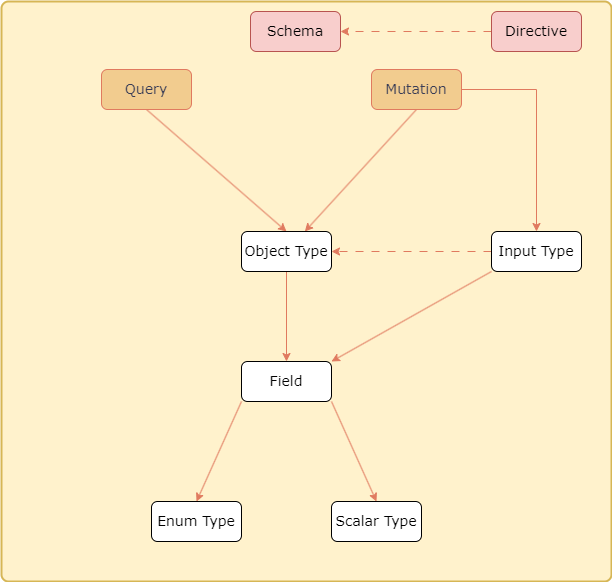
Schema: a graph that describes the whole data structure and its relations, like the image above.
Directive: marked with @, used to customize the structure inside the schema.
Operation Type
Query: a read operation.
Mutation: a change operation.
Argument
Input Type: passes the input value to a Mutation to be processed.
Object Type: made of Fields, it defines the data structure of an object. Object Field: a field of the object, used to pick which data to handle.
Variable Types
Scalar Type: ID, String, Int, Float, Boolean, and so on.
Enum Type: a custom variable type. You set the values in a group in advance, and when you use it in a Field, you can only pick a value from that group. Here is an example.
enum ROLES{
  EDITOR
  ADMIN
}
type user{
  role: ROLES
}
The flow of an API call is shown below.
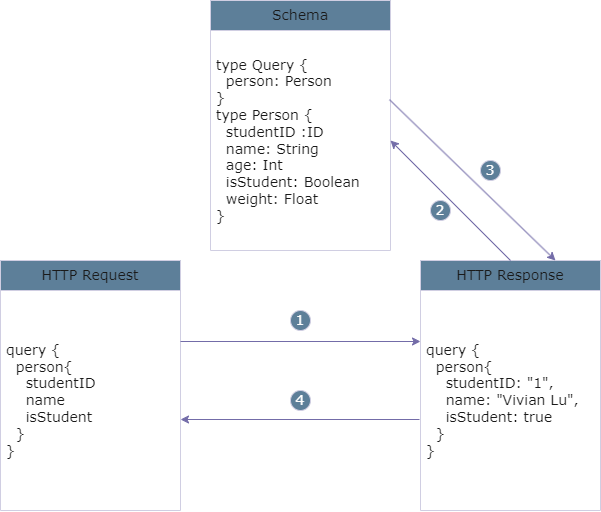
When the client sends an HTTP request, it puts the fields it wants into the POST body.
Based on the request, the HTTP server gets the needed field information from the GraphQL schema.
The GraphQL schema gives the needed information to the HTTP server.
The HTTP server sends the content back to the client.
An open GraphQL Introspection Query lets the structure be listed and leaks information#
When the Introspection Query feature is on, you can list the following.
List all type names#
Put the string below in the POST body to list every name value in the schema, which leaks all the type names.
{"query":"query { __schema { types { name fields { name } } } }"}List all type argument details#
Put the string below in the POST body to list every name, description, and type value in the schema.
{"query":"query {__schema{types{name,fields{name,args{name,description,type{name,kind,ofType{name, kind}}}}}}}"}List the schema structure#
Put the string below in the POST body to list the whole schema structure.
{"query":"query IntrospectionQuery { __schema { queryType { name } mutationType { name } subscriptionType { name } types { ...FullType } directives { name description args { ...InputValue } } } } fragment FullType on __Type { kind name description fields(includeDeprecated: true) { name description args { ...InputValue } type { ...TypeRef } isDeprecated deprecationReason } inputFields { ...InputValue } interfaces { ...TypeRef } enumValues(includeDeprecated: true) { name description isDeprecated deprecationReason } possibleTypes { ...TypeRef } } fragment InputValue on __InputValue { name description type { ...TypeRef } defaultValue } fragment TypeRef on __Type { kind name ofType { kind name ofType { kind name ofType { kind name } } } }"}Summary#
Because GraphQL is a query language where the client controls which information to get, the client can try many GraphQL statements inside the POST body. So it is a good idea for developers to turn off the Introspection Query feature in production. If you need it for development and testing, only turn it on in the development and test systems. Leaving it on in production lets an attacker easily learn the GraphQL structure. And if the access controls are set up wrongly, the attacker can use a Mutation to run change operations, which leads to unauthorized access.