
The previous post ran tool poisoning through three levels of a practice range: change nothing but the tool description on an MCP server and the agent may pack an email address and a whole chat history into a parameter that was never meant to carry them.
Back in AI Dark Arts (05) the attack surface was split into four parts: data, model, application and system. “System” is the infrastructure holding all of it up, which means the model service, the APIs, the cloud environment, the permissions and the keys.
Nothing at this layer is new. AI just made it bigger:
- An agent loop with no ceiling, burning API and token cost on the way up.
- A leaked credential, someone else calling the model with your permissions, the bill landing on you.
- One cache shared across tenants, and tenant A’s data showing up on tenant B’s screen.
- A GPU runtime that never got patched, and an attack crossing from the container to the host.
When a traditional API gets hammered, what it eats is bandwidth and host resources, and adding capacity holds the line. When a model API gets hammered, what it eats is GPU time, billed per token, and every extra word shows up on the invoice.
From browser to GPU, how many hands does it pass through#
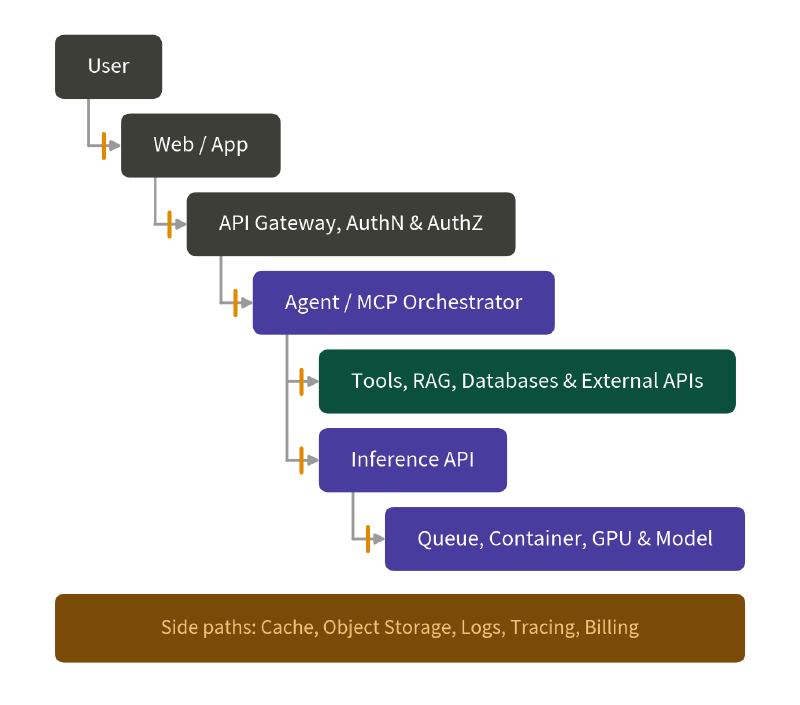
What a user types goes from the browser into the web app, then through an API gateway that checks identity and grants authorization, and only then does the agent decide whether to touch a tool, RAG, a database or an external API. The agent does not run inference itself either. It calls down into an inference API, the request goes into a queue, and a GPU inside a container does the work.
Then there are the cache, object storage, logs, tracing and billing, all of which get touched somewhere between the browser and the GPU. The bill is the sum of those segments. The only piece a user ever sees is the browser, and at every handoff after that, identity and cost can both be decided again.
Rate limits count requests; the model consumes tokens#
The usual way to rate limit a traditional API is to cap how many requests can arrive per second or per minute. That normally works, because a given endpoint does roughly the same amount of work each time.
A model API is a different story. “Hello” and a document that nearly fills the context window look identical to the gateway, one request each, while what they consume behind it is not remotely the same. The longer the input, the more tokens to process, and memory and GPU time climb with it. Images and audio carry their own processing costs on top. Cost is not just about input either: a reasoning model may generate a large volume of reasoning tokens, a failed request may retry automatically, and with an agent behind it, one user action can expand into many model calls and tool calls. All of that sits under a single request.
For a sense of how far one request can push tokens and GPU time, here is a case:
A game developer posted on Threads about a highly intelligent scholar NPC he built for a wuxia RPG, meant for players to consult on statecraft and martial arts theory. One night the server’s API token usage spiked. Digging in, he found players rewriting their calculus homework, Python errors and work emails in wuxia phrasing and handing them to the model behind the NPC.
Draining a service’s resources does not even require huge inputs. The Sponge Examples paper went looking for inputs that are short but unusually expensive to compute. The attacker does not care whether the answer is correct, only that the same answer takes far longer to produce.
The web front end may cap character count while the model works in tokens, the fragments text is chopped into. It is like a moving company quoting by the number of boxes while the people doing the lifting care about weight. Ten boxes of biscuits and ten boxes of dumbbells are the same box count and a completely different job.
The same hundred characters do not always tokenize to the same count. Rare characters, unusual symbols and a different language can all get chopped finer. Use character count as your threshold and the request looks well within limits while GPU time and the invoice go up several times over.
OWASP LLM06:2026 Unbounded Consumption covers exactly this risk. Once a system allows excessive and uncontrolled inference, an attacker gets the chance to slow or take down the service and pile cost on the way, and can also use high-volume querying to replicate model capability or steal intellectual property. The variant aimed squarely at the invoice has its own name, Denial of Wallet (DoW): the service stays up, the budget goes first.
So where do the limits go?
Per request: cap input tokens, output tokens, image and audio size, maximum execution time, and the cost a single request is allowed to reach.
Per agent run: cap the number of steps, the number of tool calls, total token usage, and how much money one run may spend. If the agent starts repeating the same step, it needs to be stoppable outright. OWASP calls that mechanism an agentic circuit breaker.
Per key, user and tenant: cap token rate, concurrency, and a daily or monthly budget for each separately. A single site-wide quota is not enough, or one tenant can eat everyone else’s capacity.
Per service: cap queue depth, GPU usage and total spend, and once past the threshold be able to reject new work, degrade the service, or route some traffic to a cheaper model.
With all four in place there is one more thing to confirm: when a limit is hit, the work actually has to stop. If a user hits cancel or just closes the browser tab, that cancellation signal has to travel all the way to the worker doing the computing. A stopped screen with a GPU still burning is just waste the user cannot see.
LLMjacking: your model, someone else’s prompts, your bill#
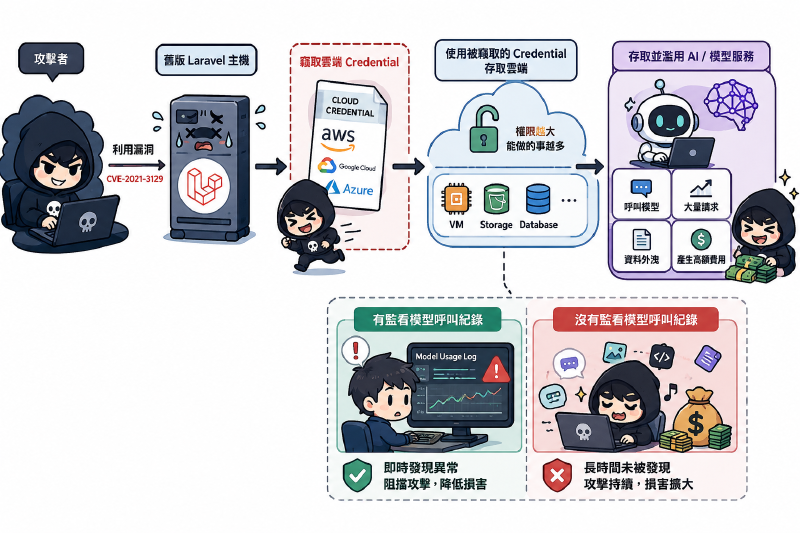
Once a credential is out, someone else can use the models in your account directly. Sysdig named this attack LLMjacking in 2024, and AWS has it in its Threat Technique Catalog.
In the Sysdig case, the way in was a machine running an old version of Laravel (CVE-2021-3129), from which the attacker took the cloud credentials stored on it. That entry path has nothing to do with AI at all. How long they could run afterwards, and how hard, came down to how much that credential was allowed to do and whether anyone was watching the model invocation logs.
So how do you defend it?
- Do not put a model provider’s API key in a browser or a mobile app. That key is long-lived, and app analysis will find it.
- Give each service its own identity for calling the model instead of sharing one across the whole system. If an attacker gets one identity, they get only what that service could do.
- Avoid long-lived credentials where you can, and prefer the short-lived identities the platform rotates for you.
- If a long-lived one is unavoidable, at least keep it in a dedicated secrets service (AWS Secrets Manager, HashiCorp Vault, Azure Key Vault all count) instead of scattered through config files and environment variables. When something does leak, that is how you work out which ones need rotating.
- Do not set quotas and budgets only at the organization level. Set them per key and per user, so when usage spikes you know which key it was and can stop that one.
- Write down which identities are allowed to call the model and which regions they call from, then compare that list against your cloud logs. An identity or a region outside the list should raise an alert, rather than waiting for the invoice at the end of the month.
In the Sysdig case, the attacker did not start running inference the moment they had the credential. They first sent a request guaranteed to fail, to see whether the error was a permissions problem or a bad-parameter problem, which told them whether they could invoke the model at all. Then they checked whether the account had model invocation logging turned on, to know whether the volume they were about to run would leave a trace. AWS’s detection guidance points at one more signal: someone requesting a quota increase for model usage usually means they are getting ready to run a lot of it.
None of those signals are visible unless the bill can be broken apart. If all you can see is what the whole cloud account spent this month, then genuine growth, a broken prompt retrying forever and a credential already in someone else’s hands look exactly the same on the invoice. The bill tells you how much more you spent, not who spent it. Every model call needs a record of who made it: which user, which feature, which agent workflow. It also needs a record of what it cost, which model and which tools it used, which region it ran in, and how many tokens and how much GPU time it consumed. That is what lets you work out what each team and each service normally spends.
With a normal number as the baseline, anomalies become visible. A workflow that suddenly starts emitting very long responses is usually a broken prompt. The same tool retrying over and over is usually a client-side problem. An identity you have never seen making heavy calls in a region where you do not even run the service should be treated as a credential in someone else’s hands. A budget alert wired to none of these records only tells you the money is gone, and you still have to walk every workflow to find out where.
Sharing a model between tenants is not the same as sharing state#
Plenty of platforms let different tenants share the same model and the same pool of inference machines. The model itself remembers nobody. The things that remember are the cache, the connection pool and the conversation memory next to it. If even one of them does not account for the tenant, data leaks to another tenant, or to a user inside the same tenant who has no right to it.
In March 2023 OpenAI took ChatGPT offline entirely over a bug in redis-py. They used Redis to hold user information so that not every request had to hit the database, with all requests taking turns borrowing connections from one pool. Some requests were cancelled before the response was read, that unread response stayed in the connection, and the next request to pick up that connection read someone else’s data straight out of it. Users saw other people’s chat titles, and within the same affected group of ChatGPT Plus users, 1.2% could see another person’s name, billing address and the last four digits of their credit card.
The connection pool is what broke in that outage, and a cache is the same kind of shared object. If the key is only a hash of the prompt, then a question already asked by an employee at company A returns A’s answer to an employee at company B asking the same thing. The key needs to carry the tenant, the user, and that user’s authorization scope at the time. RAG is no different: put two companies’ documents into one knowledge base without filtering by tenant at query time and someone at company B can reach company A’s content. Object storage paths, conversation memory and debug logs all need to be separated by tenant too. And once data is in the cache, authorization still has to be checked on every read and write, not assumed to have been handled by the layer above.
How do you verify that tenants really are separated? Have tenant A produce a unique, non-secret marker string, then go hunting for it from tenant B, one place at a time: search, cache, logs, exports, error messages, even the mail the system sends out automatically. It passes only when the string cannot be found anywhere. That ChatGPT outage happened because a request was cancelled, so the same test has to run again under retries, cancellations, timeouts, and worker reuse.
Containers do not stop everything, and GPU runtimes need patching too#
If you host the model service yourself, packing the model into a container is not enough on its own. A container only isolates processes and the filesystem, and it is still using the same host kernel. For the container to reach the GPU, a driver and a handful of tools have to broker the connection, and those tools touch the host by design. Once one of them has a vulnerability, an attacker can jump from inside the container onto the host.
In July 2025 NVIDIA published CVE-2025-23266, a CVSS 9.0 vulnerability later nicknamed NVIDIAScape. The cause was that one of the hooks the Container Toolkit runs while initializing a container trusted environment variables without filtering them. An attacker only had to supply a malicious image with LD_PRELOAD pointing at their own library, and when the hook ran it loaded that library and executed it on the host as root. “The model is already in a container” describes a deployment method, not isolation.
So what else needs covering?
- Run inference workloads as a non-root user, mount the filesystem read-only, drop the Linux capabilities it does not need, do not mount the Docker socket, and do not hand it credentials for the whole cloud account.
- On the network, allow only what it genuinely needs to reach: the model registry, the data sources, and the log and tracing collectors. Split GPUs, queues and node pools by trust level and tenant risk as well.
- Put the serving framework, container toolkit, driver, device plugin and operator into the SBOM and patch them under the same SLA. Scanning application dependencies alone is not enough.
- On Kubernetes, look at whose identity the inference pod runs under, whether it can read secrets, and whether it can create other pods. Kubernetes’ own RBAC guidance is to set
automountServiceAccountToken: falsefor workloads that do not need the Kubernetes API, rather than leaving a token mounted by default.
Which line goes up first#
| Risk | Minimum viable control | What happens without it |
|---|---|---|
| One request consuming a large amount of resource | Per-request caps on input tokens, output tokens, execution time and cost | “Hello” and a context-filling request can differ enormously on the bill |
| An agent expanding into a long chain of calls | Caps on steps, tool calls and per-run budget, with a stop on a repeated step | One user click, and the model and tools keep getting called |
| A leaked credential used to run models | No API key in the front end, a separate identity per service, only the permissions needed | Someone else uses your models, the bill lands on you |
| Money burning with no way to find the source | One correlation ID per unit of work, recording tenant, model, tools and region | You know the bill went up but cannot say which workflow to stop |
| Cancelled, but the work never stopped | Cancellation propagated all the way to the worker, with the GPU confirmed released | The screen stops, the GPU keeps burning |
| Shared cache and conversation memory crossing tenants | Cache keys carrying tenant, user and authorization scope, re-checked on every read and write | A’s content shows up on B’s screen |
| A self-hosted runtime never patched | Runtime components in the SBOM and on the patch schedule | The container boundary fails and the workload reaches the host |
If it has to be ordered, I would take credentials and budget first. Get API keys out of the front end, split identities per service and grant each only what it needs, then set usage ceilings for requests, agents, keys and tenants. A leaked credential does damage fastest and is the hardest to walk back afterwards, and once the quota is eaten the service is down and the bill already exists. Tenant isolation belongs in testing before launch, and the runtime belongs on the ordinary patch schedule rather than being updated after an incident.
Every one of these needs to be tested for real. Does a request over the token limit actually get blocked, does an agent calling the same tool repeatedly actually stop, do the worker and the GPU keep running after the user cancels, can tenant B find tenant A’s data. Those are the results to look at.
Keep the configuration, the test results, the audit logs, the monitoring dashboards, the SBOM and the version records. That is what lets someone later find out where a limit was set and whether it still applies. Otherwise the report says “rate limiting added” and six months on nobody can even find which layer it sits in.
Wrapping up#
Whose permissions each model call used, whose budget it spent, whose data it touched, and whether the work really stopped when a limit was hit: all of that has to be traceable. The next post moves to model files you download. Why a pickle can execute code at load time, and once you have switched to safetensors, which files can still change how the model behaves.