
The previous post broke an agent down into a model, tools, memory, config files and an autonomous loop. As the number of connected tools grows, an engineering problem shows up: can different AI applications use one shared language to reach all of these things?
Suppose you are building an AI assistant and you want it to read local files, query a Git repository, search company documents and open tickets. Without a shared protocol, every service you connect means handling its API, its authentication, its data formats, its tool descriptions and its error responses all over again. Add enough services and the integration code turns into a pile of adapters that all speak differently.
MCP (Model Context Protocol) exists to fix that. It defines a common way for AI applications to talk to external tools and data sources, so tools with very different capabilities can be called in a consistent way.
According to the MCP architecture documentation, it focuses on context exchange, and the usual comparison is USB: USB standardized the connector so you can plug in a mouse, a drive or a network adapter. MCP works along the same lines, letting file systems, GitHub, databases and payment services all connect to an AI application through one shared protocol.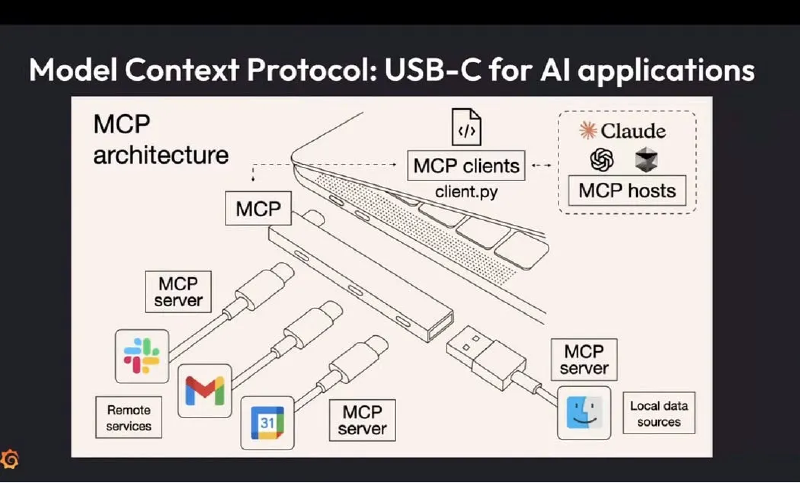
For people, this makes integrating external tools much easier. From a security point of view, every tool you connect is another door you have to defend.
The three roles in MCP: Host, Client, Server#
MCP uses a client-host-server architecture:
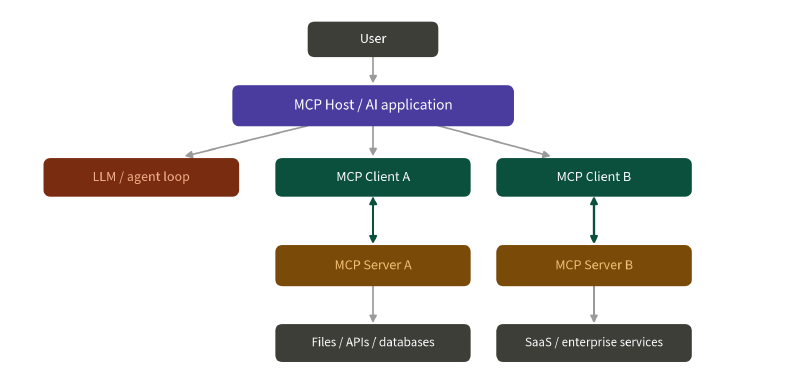
An everyday comparison, if it helps:
- Host: the phone itself, or an app on it
- Client: the module inside the phone that talks to one particular Bluetooth device
- Server: the headphones, the watch, the car stereo
Host: the AI application running the whole thing#
The Host is the AI application the user actually touches, something like Claude Desktop, Codex, Cursor or another MCP-capable chat tool or IDE. It holds the LLM session and coordinates multiple MCP clients, deciding which servers can be used. User consent, permission control and context assembly are normally handled here.
Client: a dedicated connection between Host and Server#
The Host opens one client per MCP server, and the client maintains the connection, handles capability negotiation and routes messages. That one-to-one design helps isolate servers, but whether it forms a real security boundary depends on whether the Host keeps different servers’ content and permissions apart. If the Host mixes everything every server returns into one shared context, or lets one server’s content influence another server’s tool selection, most of the isolation is gone.
Server: where the data and the actions live#
A server wraps a service into a form MCP can use, whether that is Notion, Google Drive, Slack, GitHub, a file system, an API or a database, and declares to the client what it can provide. It can be a local process or a remote service. Worth being careful here: local does not mean trustworthy and remote does not mean dangerous. A local server holding overly broad file permissions can read sensitive information unrelated to the task and feed it into the AI application, which is a data leak either way. What actually matters is where it came from, what privileges it runs with, how it authenticates and how far it can act.
What MCP is made of#
The official architecture splits MCP into two layers:
- Data layer: built on JSON-RPC, covering version and capability discovery, tools, resources, prompts and notifications.
- Transport layer: responsible for the actual communication, message framing and authorization mechanisms.
There are two common transports:
- stdio: the Host starts a local server process and talks to it over standard input and output.
- Streamable HTTP: the client talks to a remote server over HTTP, and the server can use SSE for streaming and notifications.
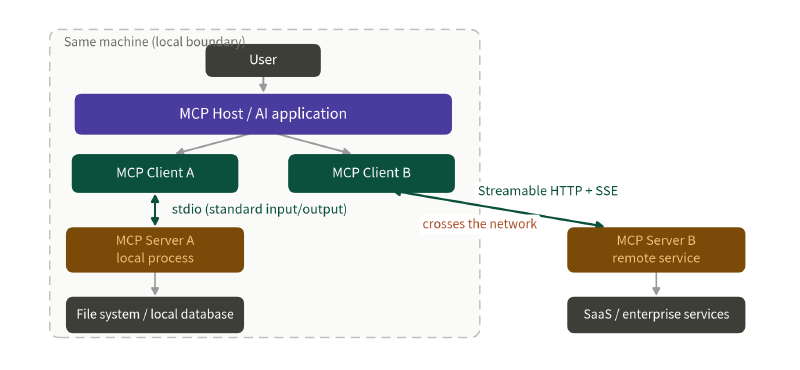
Connecting one server either way raises completely different questions. The stdio boundary is the operating system, so what you check is which command the Host uses to start the server, whose privileges it runs with, which directories that process can read and write and which environment variables it can reach. The Streamable HTTP boundary is authentication and network position, so beyond the server’s own privileges you are dealing with OAuth, token audience and TLS, along with SSRF, DNS rebinding and whether the service is exposed somewhere it should not be.
Tools, resources and prompts: the three server primitives that matter#
| Primitive | Purpose | Who usually drives it | Main security concerns |
|---|---|---|---|
| Tools | Perform actions such as querying a DB, calling an API, writing files | Model-controlled | Permissions, side effects, arguments, tool poisoning |
| Resources | Provide files, records, schemas, API responses and other context | Application-controlled | Sensitive data, indirect injection, source trust |
| Prompts | Reusable interaction templates and workflows | User-controlled | External prompt supply chain, instruction priority and provenance |
Tools: the model proposes an action to run#
A tool carries a name, a description and an input schema. The client discovers what is available through tools/list and invokes it with tools/call. The specification treats tools as model-controlled, meaning the model decides from context whether to use one. But “the model decided to use it” and “the system will actually let it run” have to stay two separate things. A model deciding it needs delete_file does not mean the executor should comply. Before that runs, something still has to establish which file, which user, and whether that user has the permission.
Resources: data the model reads can affect security too#
A resource can be file contents, a database record, an API response or a schema. It looks like read-only context, but anything that enters the model can carry sensitive data leaks or indirect prompt injection.
Beyond the content itself, the server has to confirm that the current identity is allowed to read the requested resource URI, and has to avoid path traversal, IDOR and error messages that give away too much internal detail.
Prompts: reusable templates the server provides#
A prompt is a reusable template the server supplies. It can turn a common operation into a fixed flow so different clients access it the same way. Convenient, but it also means instructions no longer originate only on the Host. A prompt from a third-party server cannot be promoted straight to high-priority instruction. Its original source and trust level have to survive.
MCP’s trust boundaries#
Lay the whole data flow out and there are at least five places where MCP needs a trust decision:
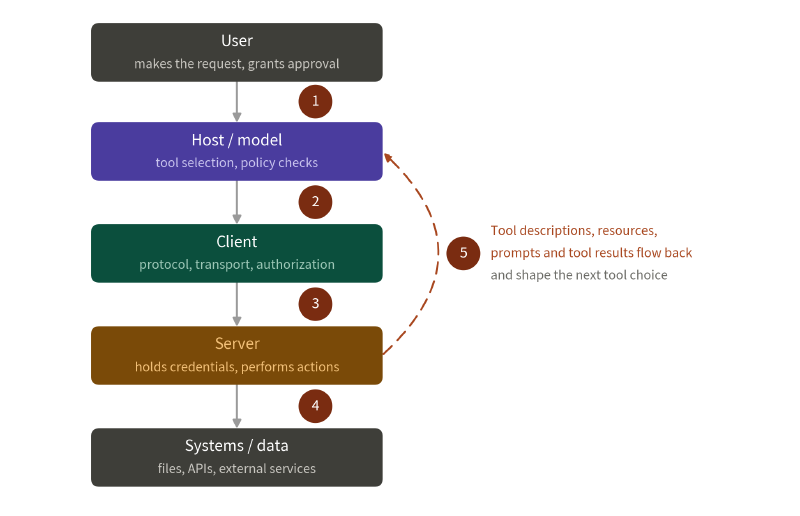
- User to Host: is the request, and the approval, specific enough?
- Host or model to Client: once the model has chosen a tool, does anything check it against policy and permissions?
- Client to Server: can the server’s identity, version, transport and authorization be trusted?
- Server to systems: which credentials is the server holding, and which data and services can it operate on?
- Server to Host and model context: do the tool descriptions, resources, prompts and tool results coming back affect the model’s later judgement, its tool selection, or even trigger the next action?
Every server you add is another risk#
An MCP server might be maintained by an official team, a third-party community, an internal team or one person’s side project, and the server itself usually depends on further packages, containers or APIs. Adopting MCP means managing more than model versions:
- Where the server came from, who maintains it, and whether it is still updated.
- Whether the packages, containers, commands and remote endpoints it uses are pinned.
- Whether the list of tools, resources and prompts has changed, and whether any description was modified.
- Which file, network and OAuth permissions and scopes the server needs.
- How to update, revoke, respond to incidents and rotate credentials when something goes wrong.
OWASP LLM04:2026 Supply Chain covers agentic supply chain risks like MCP servers and tool registries, mapping to ASI04 Agentic Supply Chain Vulnerabilities in the Agentic Top 10.
Authentication answers “who are you”, and holding a token does not authorize every action#
Remote MCP can protect sensitive resources and operations through standard authorization flows. The official authorization guide recommends splitting scopes per tool or capability, and checking at the resource server which permissions each route or tool requires.
But a successful OAuth flow only means some client authenticated and received a token. It does not mean every subsequent tool call matches the user’s permissions and intent. A few things to watch in practice:
- Bind the token to the correct audience, and never pass it through to another service.
- Use the smallest scope the tool and action need, rather than asking for
files:*,db:*oradmin:*up front. - Re-verify the user, tenant, resource and arguments on every call.
- Show the real action for high-risk operations and ask for approval again.
- Keep credentials in the Host or a controlled broker, out of reach of the model and any code it generates.
Authentication, authorization and user intent are three separate things: who you are, what you are allowed to do, and whether you actually meant to do this one.
Wrapping up#
MCP gives AI applications a consistent way to discover tools, fetch resources, load prompts and talk to local or remote servers. It lowers the cost of integration and makes external functionality much easier to attach to an agent. The more tools you attach, though, the more there is to watch: where a server came from, what permissions it holds, which data it can touch, how its responses enter the model, and who actually approved each operation.
The next post moves to the server side of MCP, where a third-party server only has to change the tool description the model reads to steer what the model does next.