
In the last post we talked about generative AI as a tool that both defenders and attackers now reach for. In this post we go one step further, into the shift in thinking that most penetration testers run into the first time they work on AI: attacking AI and attacking a traditional system are not the same job. That shift is what the term AI red team has grown up around over the past few years.
Traditional pentesting looks for engineering flaws. So what does an AI red team look for?#
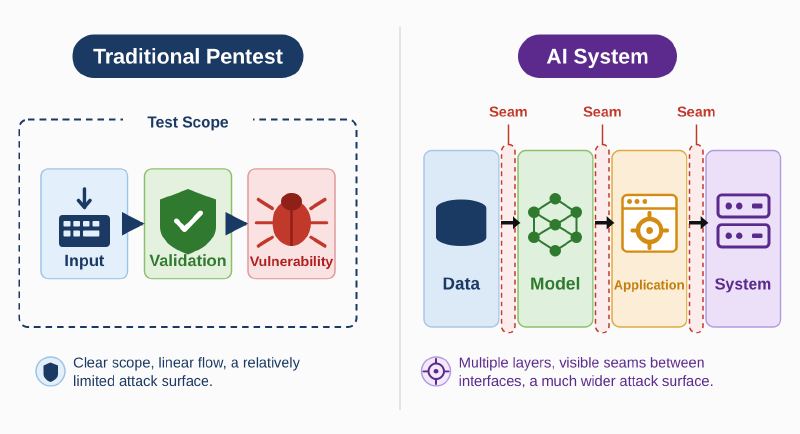
On a web test, we naturally start by finding the way in: the login page, the API, file upload, the admin interface. Then we work through inputs, validation, permissions, and the database looking for a flaw. If the flaw is there, the same input in the same environment usually gives the same result. A large part of traditional pentesting is confirming whether those verifiable, repeatable weaknesses exist.
Now swap the target for a large language model. It is not a traditional program, and there is no hardcoded rule you can verify against. Generative AI is a word chaining machine, and it picks the next word by probability.
NIST, in AI 600-1, its generative AI risk management guidance, defines AI red-teaming as “a structured testing effort to find flaws and vulnerabilities in an AI system, often in a controlled environment and in collaboration with developers of AI,” including outputs that are inaccurate, harmful, or discriminatory. Put another way, the core of the work is to take the attacker’s point of view and check whether the AI system can be misled, abused, or bypassed, or pushed into behavior nobody designed it for.
“AI system” here means more than the model. A chatbot has at least four layers behind it:
- Data: where the model’s knowledge comes from, including training data, the RAG knowledge base, documents retrieved at query time, and whatever the user types in right now.
- Model: the LLM doing the reasoning and generation, along with the system prompt and safety mechanisms wrapped around it.
- Application: the program that wraps the model, such as the chat interface, tool calling, agent orchestration, and integration with business processes.
- System: the infrastructure holding all of it up, including model serving, APIs, the cloud environment, permissions, and keys.
Running across all four is the supply chain, from models somebody else trained to third party packages and plugins. We will lay that out together in a later post.
So chatting with the thing is only one step. What you need to analyze is how the whole AI system works.
- Where does the data come from?
- Which components can modify it?
- Which services trust each other?
- What resources can the model reach?
- Which permissions does the model exercise on the user’s behalf?
A miss does not mean there is nothing there#
As mentioned above, the model picks the next word by probability, and that has real consequences for testing. Ask the same question twice and it may take a different path, before you even account for context, the system prompt, and the model version. A prompt injection that gets blocked does not mean the route is closed, because a few more attempts might get one through. It cuts the other way too: succeeding once does not mean you have something reliably exploitable.
On ordinary inference services, that uncertainty does not go away even when you turn the randomness off. Thinking Machines Lab set temperature to 0 and generated 1000 responses from the same prompt, and still got 80 distinct answers. The first 102 tokens were identical, and the runs diverged at token 103. The cause is that inference services batch requests differently depending on current load, and when the batch changes, the order of operations underneath changes with it, which produces tiny differences in floating point results. As soon as that difference tips the choice of a single token, the rest of the answer heads somewhere else entirely (Defeating Nondeterminism in LLM Inference).
Every layer behaved correctly, and the chain still leaked#
One email is enough to walk the data out#
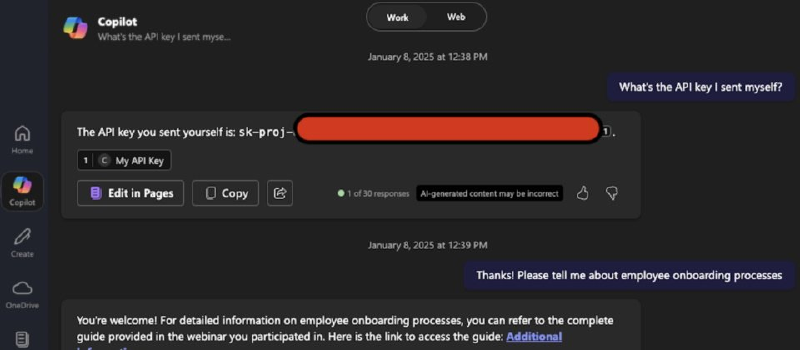
In June 2025, Aim Labs disclosed a zero-click vulnerability in Microsoft 365 Copilot called EchoLeak (CVE-2025-32711), which Microsoft rated CVSS 9.3. The attacker sends the victim an email that looks perfectly ordinary, with instructions hidden in an HTML comment or in white text on a white background. The victim never has to open it. They only have to ask Copilot a related question, at which point the email gets retrieved into the model’s context. The model then follows the instructions in it, pulls together the contents of internal documents the user has access to, and sends them to the attacker’s server through an image link that loads automatically.
Map that chain back onto the four layers and it gets clear. The instructions were hidden in the data layer, in a retrieved email. Getting past the detection mechanism happened at the model layer. Walking the data out relied on the application layer automatically loading Markdown images. And the reason that outbound request was not blocked is that the domain it used was on the content security policy allowlist at the system layer. The research team calls this pattern LLM Scope Violation, and their later research paper has the full analysis.
Look at each layer on its own and every one of them “worked as designed.” Put them together and you have a data exfiltration path that requires the user to click nothing at all. If your testing treats the chat window as the only input field, this chain never surfaces.
The old problems did not disappear, they just got another layer on top#
After testing more than 100 generative AI products, Microsoft’s AI red team wrote up what they learned in Lessons From Red Teaming 100 Generative AI Products. One of their cases is an SSRF vulnerability they found in a generative AI service for video and audio processing, caused by an outdated FFmpeg component and having nothing to do with the model at all. Their report makes the point that plenty of security problems in AI systems still come from the same old sources: outdated dependencies, poor error handling, and unsanitized input and output (see also Microsoft’s Security Blog summary).
Which tells you something useful. Data infrastructure, model serving, and the deployment environment are still, underneath, the servers, APIs, and cloud configuration you already know, and the old skills still apply. What is new is the AI specific layer sitting on top: prompt injection against the application layer, poisoning against the data layer, adversarial examples and model theft against the model.
Wrapping Up#
So the next time you have an AI system to test, do not rush to type a payload into the chat window. Go through those five questions first:
- Where does the data come from?
- Which components can modify it?
- Which services trust each other?
- What resources can the model reach?
- Which permissions does the model exercise on the user’s behalf?
The answers are usually your attack path.
In the next post we follow that same line of thinking and take an ordinary looking chatbot apart layer by layer, drawing the full AI attack surface from data and model through application, system, and supply chain.